What Is OpenClaw and How It Can Help You Be More Efficient
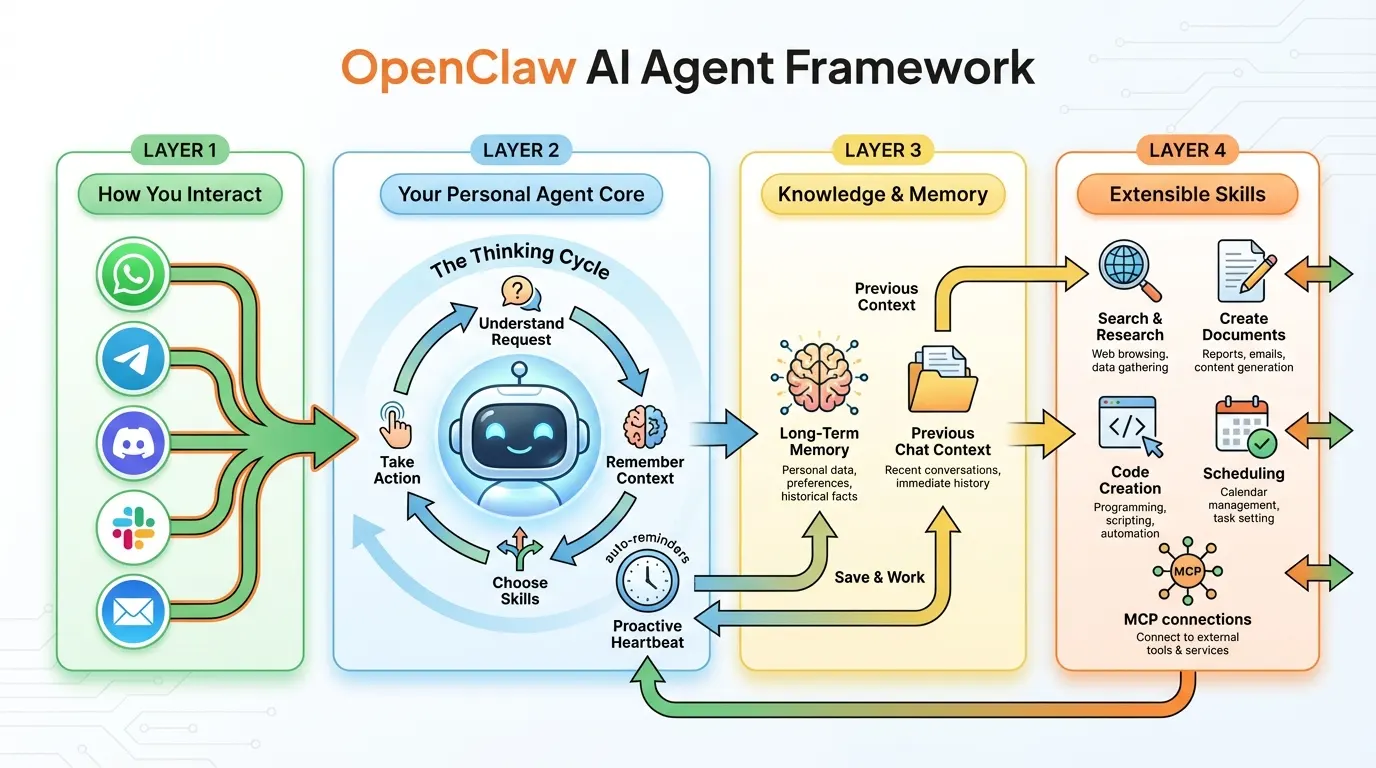
The simplified view above shows the four layers at a glance. Scroll down to the technical architecture section for the detailed breakdown.
The AI landscape shifted significantly when OpenClaw appeared in late 2025 (originally as “Clawdbot”) and promptly collected over 60,000 GitHub stars in 72 hours. Created by PSPDFKit founder Peter Steinberger, it represents a different philosophy from most AI tools: instead of giving you a chatbot that answers questions, OpenClaw gives you an AI agent that lives on your machine and actually does things.
If tools like ChatGPT and Claude are “brains that talk,” OpenClaw is a brain with hands, eyes, and a memory.
The Core Idea
OpenClaw is an open-source framework that runs locally on your machine (Mac, Windows, or Linux) and connects a Large Language Model — Claude, GPT-4, DeepSeek, or even a local model via Ollama — to your operating system, files, messaging apps, and web browser.
The key distinction is that OpenClaw doesn’t just generate text. It executes tasks. It can manage your files, send messages on your behalf, browse the web, write and run code, and do all of this through the messaging apps you already use — WhatsApp, Telegram, Discord, Signal, Slack, iMessage, or email.
Think of it as building your own JARVIS, except it’s open-source, runs on your hardware, and you control which AI model powers it.
Understanding the Architecture: The Conceptual View
Before diving into the technical details, here’s the mental model. OpenClaw is organized in four layers that separate concerns cleanly:
Layer 1 — How You Interact: Your existing messaging apps (WhatsApp, Telegram, Slack, Discord, email) serve as the interface. You don’t learn a new app; you talk to your agent through channels you already use.
Layer 2 — Your Personal Agent Core: The central “thinking cycle” where your agent understands requests, remembers context, chooses the right skills, and takes action. A proactive scheduler (the “heartbeat”) lets the agent do things without being asked — auto-reminders, auto-workflows, background monitoring.
Layer 3 — Knowledge & Memory: Long-term memory stored as local Markdown files and indexed with vector search. Previous chat context persists across conversations. Your agent learns your preferences, your projects, and your patterns over time.
Layer 4 — Extensible Skills: A growing library of capabilities — search and research, document creation, code generation, scheduling, and connections to external services via MCP. Skills are modular, shareable, and the agent can even write new ones on its own.
Deep Dive: The Technical Architecture
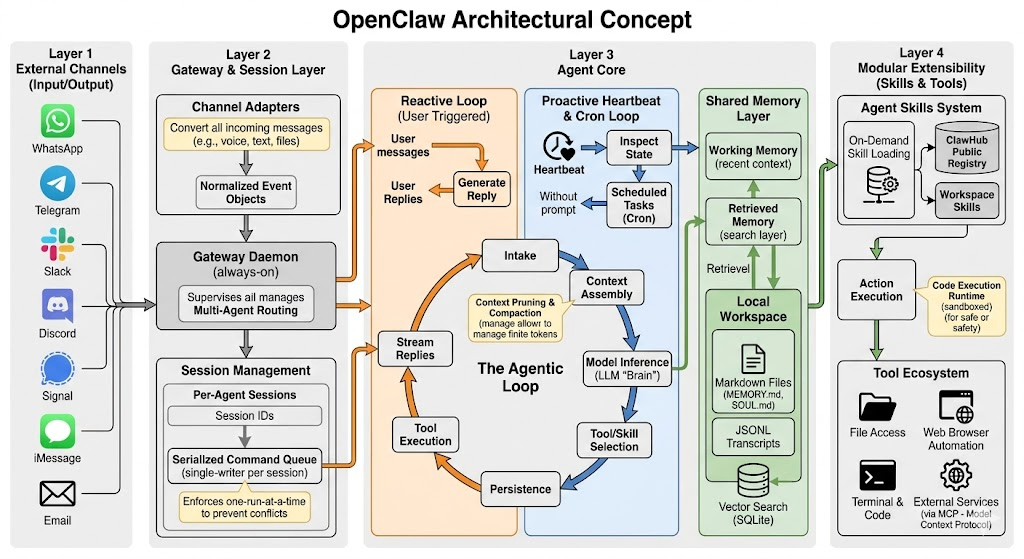
For those who want to understand (or extend) the system, here’s how the layers break down technically.
Layer 1: External Channels
Channel Adapters convert every incoming message — whether it’s a voice note, an image, a file attachment, or plain text — into Normalized Event Objects. This abstraction means the agent core doesn’t care whether a request came from WhatsApp or email; it processes a unified format.
Channels are bidirectional. You send a photo of a receipt via WhatsApp and get structured expense data back. You forward an email and get a drafted reply. You send a voice message via Telegram and get a text-based action plan.
Currently supported channels include WhatsApp, Telegram, Discord, Slack, Signal, iMessage, and email, with community-built adapters for SMS, Microsoft Teams, and custom webhooks.
Layer 2: Gateway Daemon and Session Management
The Gateway Daemon is an always-on process that supervises all agent operations. Its responsibilities include:
Multi-Agent Routing — You can run multiple specialized agents (one for work, one for personal tasks, one for a specific project), and the gateway routes messages to the correct agent based on channel, keywords, or explicit agent selection.
Per-Agent Sessions — Each agent maintains its own session with a unique ID, preserving conversation state independently. Your work agent doesn’t mix context with your personal agent.
Serialized Command Queue — This is a critical design decision. Each session enforces a single-writer-per-session model with one-run-at-a-time execution. When you ask your agent to “organize my downloads folder and then email me a summary,” those tasks execute in sequence, not in a race condition. This prevents context corruption and ensures reliable multi-step workflows.
Stream Replies — Responses are streamed back to the user in real-time through the originating channel, so you see progress as the agent works rather than waiting for a complete response.
Layer 3: The Agent Core
This is the heart of the system, and it contains three critical subsystems:
The Agentic Loop
Every request passes through a cycle: Intake → Context Assembly → Model Inference → Tool/Skill Selection → Tool Execution → Persistence. Context pruning and compaction manage the finite token window, ensuring the agent maintains focus on relevant information even during long-running tasks.
The agent core operates in two distinct modes:
The Reactive Loop (User Triggered) — Standard request-response. A user message enters, the agent generates a reply, executes tools if needed, and streams the response back. The loop continues until the task is complete.
The Proactive Heartbeat & Cron Loop — This is OpenClaw’s most distinctive feature. Without any user prompt, the heartbeat periodically inspects system state and runs scheduled tasks. This loop drives autonomous behaviors: checking email, monitoring deployments, generating daily summaries, sending reminders. The heartbeat mechanism is what transforms OpenClaw from a reactive chatbot into a proactive agent.
The Shared Memory Layer
Memory operates at two tiers:
Working Memory — The current conversation context, including recent messages, active tool results, and session state. This is what the model “sees” during inference.
Retrieved Memory — Long-term knowledge pulled from a search layer. OpenClaw stores memory as local Markdown files (including MEMORY.md and SOUL.md files that define the agent’s personality and accumulated knowledge) and JSONL transcripts. These are indexed via vector search backed by a local SQLite database, enabling semantic retrieval of relevant memories during context assembly.
The memory system means your agent gets better over time. It remembers that you prefer bullet-point summaries over paragraphs, that your standup format follows a specific template, that “the Q1 project” refers to a specific directory on your machine. All of this is stored locally — nothing leaves your hardware.
Persistence
Every interaction generates persistent artifacts: updated memory files, JSONL conversation transcripts, and vector search index entries. This persistence layer is what makes OpenClaw stateful across sessions and reboots.
Layer 4: The Tool and Skill Ecosystem
Agent Skills System — Skills load on demand from three sources: ClawHub (a public registry), globally installed skills, and workspace-specific skills. Each skill is a directory containing a SKILL.md file with metadata, instructions, and tool usage guidelines. Workspace skills take precedence, allowing project-specific customization.
The Agent’s Self-Extension Ability — OpenClaw can autonomously write code to create new skills when it encounters a task it doesn’t have a built-in capability for. This self-extension means the agent’s capabilities grow organically with use.
Tool Ecosystem — The execution layer includes file access, web browser automation, terminal and code execution (sandboxed for safety), and external services via the Model Context Protocol (MCP). Code execution runs in a sandbox with configurable security levels — restricted mode for caution, full-access mode for trusted environments.
Your Day, Augmented: Real-World Daily Workflows
Architecture diagrams are nice, but the real question is: how does this change your Tuesday?
7:30 AM — Before You Even Sit Down
Your OpenClaw agent has been awake since 6 AM. The heartbeat ran its morning routine: it checked your email, scanned your Slack channels, reviewed your calendar, and compiled a morning briefing. By the time you open Telegram, there’s a message waiting:
“Good morning. 3 items need attention: (1) The staging deploy from last night failed — the error log suggests a database migration issue. (2) You have a client meeting at 10am — I’ve attached their latest proposal and the notes from your last call. (3) Your flight to Berlin next week was rescheduled to a 2pm departure.”
You haven’t opened a single app yet, and you already know what your day looks like.
9:00 AM — Communication Triage
Instead of checking five different messaging apps, you send one message via WhatsApp: “Summarize everything important from Slack, email, and Discord since yesterday, grouped by project.”
Your agent compiles a structured summary: what happened on each project, who’s waiting for your input, which threads are informational vs. action-required. You reply with quick decisions — “tell Jake I’ll review it by noon” or “forward the invoice to accounting” — and the agent executes each through the appropriate channel.
Time saved: 45 minutes of app-switching and context-loading, replaced by 10 minutes of focused decision-making.
11:00 AM — Research While You Work
During your client call, you realize you need competitive analysis on three companies by tomorrow. Normally this would mean an afternoon of web research, note-taking, and formatting. Instead, you message your agent: “Research these three companies — their latest product launches, pricing changes, and any recent news. Compile a comparison document and put it in my Google Drive.”
Your agent works on this in the background. By the time your call ends, there’s a formatted document waiting. You spend 15 minutes reviewing and editing rather than 3 hours creating from scratch.
2:00 PM — Automated Operations
You manage a small team and need to compile weekly status updates. This used to mean chasing people for updates, manually collecting them, and formatting a report. Now: “Compile this week’s completed tasks from our Linear board, combine them with the key Slack discussions from #engineering, and format the weekly update using the standard template. Post it to #leadership by 4pm.”
The agent collects, synthesizes, and formats. You review a draft, make two small edits, and approve the post.
6:00 PM — Proactive Monitoring
You’re done for the day, but your agent isn’t. The heartbeat continues to monitor: watching for deployment alerts, checking if the database migration from this morning was resolved, and tracking a price alert you set on a supplier’s website. If anything requires your attention, you’ll get a Telegram message. Otherwise, silence means everything is fine.
The Weekend — Personal Life Benefits
OpenClaw isn’t just for work. Your personal agent tracks package deliveries, reminds you about bills before they’re due, monitors prices on items you’re shopping for, and keeps your family calendar conflicts resolved. The same architecture that powers your work automation handles personal productivity — one framework, multiple agents, each with their own context and personality.
The Compound Productivity Effect
The individual time savings are meaningful — 30 minutes here, an hour there. But the real transformation is in what you do with that reclaimed time.
When communication triage takes 10 minutes instead of 45, you start the day with mental energy instead of information fatigue. When research happens in the background, you have time for the creative thinking that research is supposed to inform. When status updates compile themselves, you spend that hour on strategy instead of administrative work.
Over a week, the numbers compound: 5-8 hours of reclaimed time is common for knowledge workers who’ve integrated OpenClaw into their daily routine. Over a month, that’s nearly an extra work week. Over a year, it’s the equivalent of two additional months of focused, high-value work.
The people getting the most value from OpenClaw aren’t those who use it for occasional tasks. They’re the ones who’ve restructured their workflows around it — building heartbeat routines for recurring work, creating skills for common operations, and training the memory system with their preferences and patterns.
Getting Started
Setting up OpenClaw involves installing the framework, configuring at least one messaging channel, and providing an API key for your chosen LLM. The project’s documentation walks through each step, and the community on GitHub and Discord is active and helpful.
For local-only setups (no cloud LLM), you can pair OpenClaw with Ollama to run models like Llama or Mistral entirely on your hardware. Performance depends on your machine, but for many tasks, local models are more than capable.
The recommended starting point: configure one messaging channel (Telegram is the most popular), connect to Claude or GPT-4 via API key, and start with simple tasks. “Summarize my last 10 emails” or “remind me about X tomorrow at 9am.” As you build confidence, graduate to heartbeat routines, multi-step workflows, and custom skills.
Who Is It For?
OpenClaw appeals to several groups:
Developers and power users who want a programmable AI assistant they fully control — the architecture is designed for extensibility, and the skill system makes customization natural.
Privacy-conscious users who want AI capabilities without sending data to the cloud — the local-first architecture means your files, conversations, and memory stay on your hardware.
Teams and small businesses looking to automate repetitive communication and operational tasks without enterprise licensing fees or vendor lock-in.
Tinkerers and builders who enjoy constructing tools — OpenClaw’s open-source nature and self-extending skill system make it a playground for experimentation.
It requires more setup than a hosted AI service, but the tradeoff is complete control over your data, your agent’s behavior, and which AI model powers it.
The Bigger Picture: Why This Matters
OpenClaw represents a shift in how we think about AI tools. Instead of visiting a website to chat with an AI, the AI comes to you — through the apps you already use, with access to the tools you need, and with memory that makes it more useful over time.
The proactive heartbeat is the key innovation. Most AI tools wait for you to ask. OpenClaw monitors, anticipates, and acts — turning dead time into productive time. Your commute, your lunch break, your sleep — the agent works through all of it.
The open-source nature means the community drives development, and the local-first architecture means your data stays yours. As the ecosystem of skills, channels, and integrations grows, the gap between what you can do with a personal AI agent and what you can do without one will only widen.
Whether you’re looking to automate repetitive tasks, build a personalized assistant, or experiment with what autonomous AI agents can do, OpenClaw is the most capable and accessible framework available today. The question isn’t whether AI agents will become part of daily workflow — it’s whether you’ll be an early adopter or a late one.