You’ve probably seen the headlines: “Claude can now use your computer.” Behind the clickbait, there’s a genuinely useful product called Claude Cowork — and it’s aimed squarely at people who aren’t developers but still spend their days wrestling with documents, spreadsheets, research, and file management.
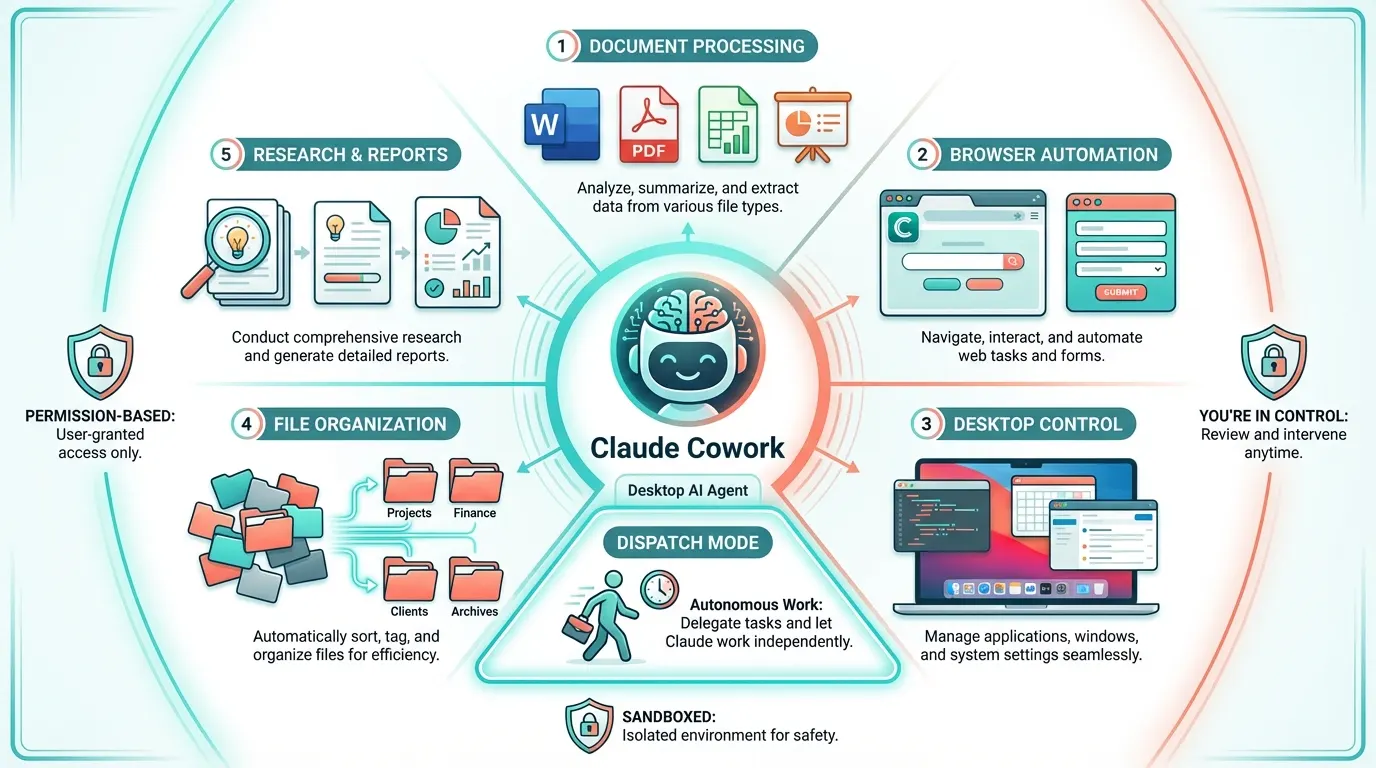
Here’s the pitch: Claude Cowork is a desktop AI agent from Anthropic that can work with your local files, create documents, automate multi-step workflows, and even control applications on your Mac — all through a conversational interface. No terminal, no code, no technical setup required.
But the pitch doesn’t capture the magnitude of the shift. Cowork isn’t a slightly faster way to do your existing work. It’s a fundamental reorganization of how knowledge work gets done — the same way spreadsheets didn’t just make accounting faster, they changed what accountants could do.
How It Differs from Claude Code
If Claude Code is built for developers (terminal, IDE, git, code), Claude Cowork is built for everyone else. It shares the same underlying Claude intelligence, but the interface and capabilities are oriented toward knowledge work rather than software engineering.
Claude Code operates as a short-session coding assistant: open terminal, describe task, get code. Claude Cowork enables long-running autonomous workflows: give it a complex task, and it works through it step by step — creating files, processing documents, organizing data, and coordinating multiple operations — while you do something else entirely.
The key architectural differences: Cowork uses a folder-permission model (you grant it access to specific directories), runs within Apple’s Virtualization Framework for security, and can spawn multiple Claude instances to handle independent subtasks concurrently.
What It Can Actually Do
Document Processing at Scale
This is Cowork’s sweet spot. Give it a folder of PDFs, Word documents, or spreadsheets and ask it to extract, transform, summarize, or reorganize the contents. “Read all the invoices in this folder, extract the vendor name, date, and total, and create a spreadsheet with the results.” That’s a single prompt that replaces an hour of manual data entry.
It handles Word documents (.docx), Excel spreadsheets (.xlsx), PowerPoint presentations (.pptx), PDFs, CSVs, and more — not just reading them, but creating professional-quality output with proper formatting, tables of contents, charts, and styling.
File Organization and Management
“Go through my Downloads folder, categorize everything by type and project, move them into organized subfolders, and give me a summary of what you found.” Cowork can read file contents and metadata to make intelligent decisions about organization, not just sort by file extension. It understands that a PDF titled “Q1 Budget Review” belongs in your Finance folder, not just in “PDFs.”
Research and Report Generation
Point Cowork at a collection of source documents and ask it to synthesize a report. It reads through the materials, extracts key findings, cross-references information, and produces a structured document — complete with proper formatting, citations, and an executive summary. Researchers, analysts, and consultants use this daily.
Presentations and Visual Documents
Need a slide deck? Describe the topic, audience, and key points, and Cowork creates a PowerPoint presentation with proper layouts, speaker notes, and visual structure. Need to update an existing deck? It can read and modify .pptx files directly. Need a chart in your report? It generates Excel charts from data and embeds them.
Browser Automation
Through the Claude in Chrome extension, Cowork can navigate web pages, fill forms, extract data from dashboards, and automate browser-based workflows. When no dedicated integration exists for a web app, Cowork falls back to browser automation — clicking, typing, and reading the screen just like you would.
Desktop Control
The computer-use capability lets Cowork interact with native macOS applications. It can open apps, navigate interfaces, click buttons, type text, and read screen content. This means it can work with applications that have no API or automation support — your accounting software, design tools, or industry-specific applications.
Your Day, Augmented: Real Scenarios
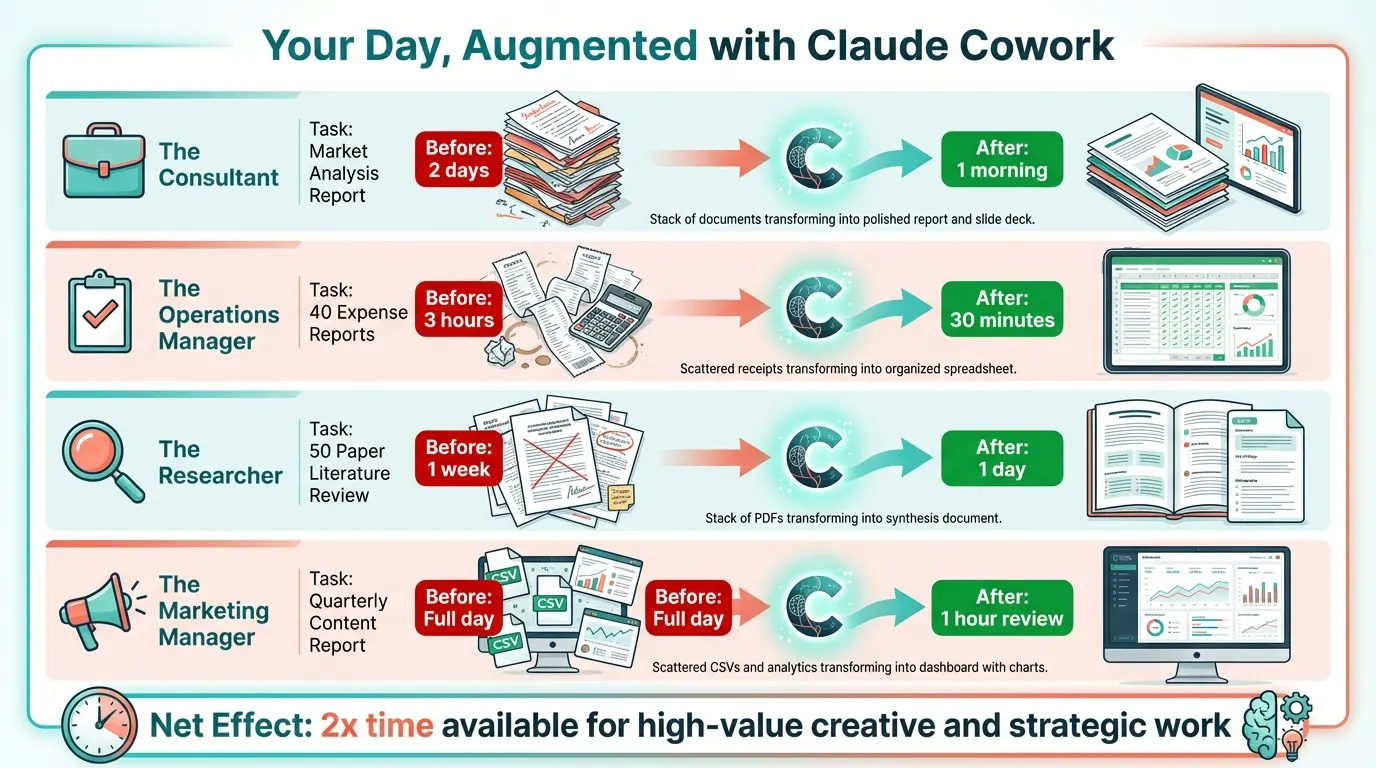
The capability list sounds broad. Here’s what it looks like in practice, for different roles.
The Consultant
Monday morning, 8:00 AM. You have a client deliverable due Wednesday: a market analysis report covering five competitors, with a SWOT analysis, pricing comparison, and strategic recommendations. The old way: two full days of research, writing, formatting, and slide creation.
With Cowork:
Hour 1: “Search the web for the latest information on these five companies. For each, find their current pricing, recent product launches, funding history, and notable press coverage. Save your findings as structured notes in my Research folder.”
You go get coffee. When you come back, there are five research documents waiting — each one structured with consistent sections you can scan in seconds.
Hour 2: “Using the research notes you just created, write a market analysis report in Word format. Include a SWOT analysis for each competitor, a pricing comparison table, and three strategic recommendations. Use the client report template from my Templates folder.”
You work on other client work while Cowork produces the draft. You spend 30 minutes reviewing and adjusting the narrative.
Hour 3: “Convert the key findings from this report into a 12-slide presentation. Use the company PowerPoint template. Include a competitive landscape slide, a pricing comparison chart, and an executive summary slide with the three recommendations.”
By lunch, you have both a detailed report and a presentation deck. What used to take two days is done in a morning. The afternoon is yours for higher-value work — strategy sessions, client calls, business development.
The Operations Manager
Friday afternoon. You need to reconcile expense reports from 40 team members, flag any that exceed policy limits, generate a summary for Finance, and update the tracking spreadsheet.
Step 1: “Read all the PDFs in my Expense Reports folder. For each, extract the employee name, date, category, amount, and receipt image. Create a master spreadsheet with all entries sorted by employee.”
Step 2: “Compare each expense against our policy limits” — you provide the policy document — “and flag any that exceed the threshold. Add a ‘Status’ column with ‘Approved’, ‘Needs Review’, or ‘Over Limit’ for each entry.”
Step 3: “Generate a summary report for Finance showing total expenses by category, the flagged items, and a comparison to last month’s figures.”
Three hours of manual cross-referencing, replaced by 20 minutes of Cowork execution and 10 minutes of review.
The Researcher
You’re working on a literature review and have 50 academic papers saved as PDFs. Reading and summarizing each one would take a week.
“For each PDF in this folder, extract the title, authors, publication year, methodology, key findings, and conclusions. Create a summary document for each paper, then create a master document that synthesizes the common themes, identifies gaps in the literature, and suggests areas for further research.”
Cowork processes the papers one by one, building a structured understanding of the field. You review the summaries and synthesis — catching errors, adding nuance, refining the narrative. A week’s work compressed into a day.
The Marketing Manager
You need to produce a quarterly content report from data scattered across multiple sources: website analytics exports, social media CSV files, email campaign reports, and a Google Sheet with influencer tracking.
“Read the analytics export, the social media CSVs, and the email campaign PDF reports. Combine the data into a single Excel dashboard with tabs for each channel, pivot tables showing month-over-month trends, and charts visualizing the key metrics. Then create a one-page executive summary in Word.”
The data processing, chart creation, and formatting that would have taken most of a day happens while you’re in a meeting. You come back to a polished report that needs ten minutes of editing.
The Dispatch Feature: Work While You’re Away
One of Cowork’s most powerful features is Dispatch. Start a task, tell Cowork to keep working, and walk away. Go to lunch, attend a meeting, or just focus on something else. Cowork continues executing autonomously, and you come back to completed work.
This isn’t theoretical — it’s practical for tasks like “process these 200 receipts into a categorized spreadsheet” or “review these 30 research papers and create a summary document for each one.” Tasks that would take you half a day finish while you’re doing other things.
The psychological impact is underrated. When you know that grunt work is being handled, you approach your focused work with less anxiety and more mental clarity. The cognitive load of “I still need to do that report” evaporates when you know it’s being done right now.
Projects: Context That Persists
The Projects feature lets you attach local folders, instructions, and context to named projects. Instead of re-explaining your preferences and file locations every session, you set up a project once — “Q1 Financial Reports” with its folder, formatting preferences, and standard templates — and every subsequent session starts with that context already loaded.
This is particularly valuable for recurring work. Your weekly report project remembers where the data comes from, how the output should be formatted, and what distribution list it goes to. Your client deliverables project knows your template, your writing style, and the standard sections each report should include.
Projects transform Cowork from “a tool you use” into “a workflow that runs.” The setup cost is a few minutes; the ongoing time savings are permanent.
Plugins and Integrations
Cowork supports plugins — installable bundles of MCP servers, skills, and tools that extend its capabilities. Connect to Slack for messaging, use specialized tools for image processing, link to project management platforms, or install community-built extensions for industry-specific workflows.
The plugin ecosystem means Cowork’s capabilities grow over time. As new integrations are built, you can add them without waiting for Anthropic to build native support. The Slack plugin alone opens up workflows like “summarize today’s important messages and draft replies for my review” — combining Cowork’s document intelligence with your communication channels.
The Productivity Multiplier: Why This Is a Massive Opportunity
Let’s quantify the impact. A typical knowledge worker spends their day roughly like this:
30% creating documents and presentations — reports, decks, emails, proposals. Much of this is formatting, structuring, and templating work that doesn’t require your unique expertise.
20% processing and organizing information — reading documents, extracting data, compiling summaries, organizing files. Essential but mechanical.
15% communication overhead — checking messages, writing updates, scheduling, coordinating. Necessary but interruptible.
15% research and analysis — gathering information, comparing options, building understanding. Valuable, but the gathering phase is often the bottleneck.
20% high-value thinking — strategy, decision-making, creative problem-solving, relationship building. The work only you can do.
Cowork’s impact is most dramatic in the first two categories and meaningful in the next two. Document creation time drops by 60-80% — you’re editing and reviewing rather than writing from scratch. Information processing becomes largely automated. Research gathering happens in the background while you think.
The net effect: your time available for high-value work roughly doubles. Over a month, that’s 40+ hours freed for the thinking, creating, and relationship-building that actually drives outcomes in your career. Over a year, it’s the equivalent of adding several months of focused creative work to your calendar.
This isn’t about working faster. It’s about working on the right things, while Cowork handles the rest.
Safety and Control
Anthropic built Cowork with several layers of safety:
Permission-based access — Cowork asks before accessing new applications or folders. You explicitly approve what it can see and do.
Sandboxed execution — Code runs in an isolated environment. Cowork can’t accidentally (or intentionally) damage your system.
AI safety classifier — Routine operations are automatically approved, while potentially destructive actions require explicit confirmation. Cowork won’t delete your files without asking.
No financial actions — Even with full desktop access, Cowork won’t execute trades, send money, or make purchases. It will help you prepare a transaction, but the final click is always yours.
Getting Started
Cowork is currently available as a research preview on macOS for Claude Pro ($20/month) and Max subscribers. Windows support launched in early 2026. You install the desktop app, sign in with your Claude account, select a folder to work in, and start describing tasks.
The learning curve is minimal. If you can describe a task to a colleague, you can describe it to Cowork. Here’s a suggested progression:
Week 1: Start with single-file tasks. “Create a presentation about X.” “Summarize this PDF.” “Format this data as a spreadsheet.” Get a feel for the quality of output and how to give effective instructions.
Week 2: Graduate to multi-file workflows. “Read these five documents and create a comparison table.” “Process all the invoices in this folder.” Start using Projects to save context.
Week 3: Set up recurring workflows. Create projects for your weekly report, monthly analysis, or regular deliverables. Use Dispatch for longer tasks.
Week 4: Expand to browser and desktop automation. Connect plugins. Build workflows that span multiple tools and data sources. By now, you’re not using Cowork for occasional tasks — it’s an integrated part of how you work.
Where It Fits in the AI Landscape
Claude Cowork occupies a unique space. It’s not a chatbot (it takes real action on your files). It’s not a developer tool (no code required). It’s not a simple automation tool (it understands context, makes decisions, and handles ambiguity). It’s closest to having a capable assistant sitting at your computer, able to do the work you’d otherwise do yourself.
The people who will benefit most are those who currently spend significant time on document-heavy, repetitive knowledge work — and who recognize that the hours freed up are an opportunity to focus on the creative, strategic, and human work that AI can’t replicate.
For knowledge workers, the shift from “AI that talks about work” to “AI that does the work” isn’t incremental. It’s transformational. And Cowork is the most accessible entry point to that transformation available today.